




How to troubleshoot oil pressure alarm in oiler
The lubricating oil level is low and the lubricating oil is empty and not replaced in time, causing air to enter the pipeline and the machine cannot operate. Report a repair immediately and ask an after-sales engineer to come to your door to handle it? Don’t worry, doing so will only lengthen the downtime and increase maintenance costs. We try the following methods on our own, which can basically solve this problem.
Applicable to all new models
1. There is a blank button next to the handwheel button on the panel. Press and hold it for 5 seconds to force oiling and exhaust air.
2. Repeat several times until the oil pressure gauge pointer reaches the green area and the air is discharged.
FANUC System V series models
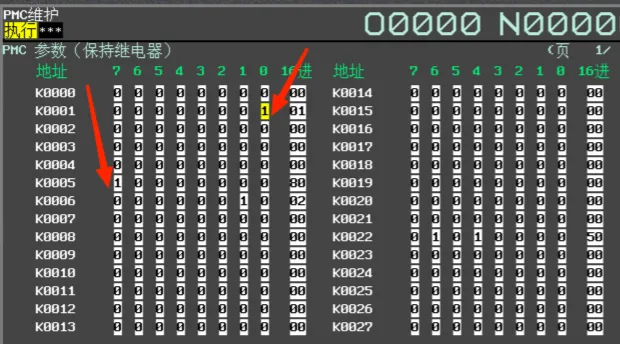
1. Press the SYSTEM function key on the panel, press the expansion key in the lower right corner of the screen, then press the PMC maintenance key, and press the K parameter key
2. Enter the K parameter interface, set K5.7 to 1 to block the oil pressure alarm, and set K1.0 to 1 to force the grease pump to open. At this time, the grease pump starts oiling. After 2 minutes of oiling, set K1.0 to 0 to turn off oiling. Force oiling once every 2 minutes. Observe whether the oil pressure gauge pointer is in the green area when the grease pump is working.
3. After the oil pressure is normal, change K5.7 and K1.0 to 0
FANUC System T series models
After replacing the oil bag, the oil pressure is low when the oil is pumped. The steps for manual forced oil pumping and air exhausting are as follows:
1. Press the SYSTEM function key on the panel, press the expansion key in the lower right corner of the screen, press the PMC maintenance key, and press the K parameter key
2. Enter the K parameter interface and set K6.4 to 1 to shield the oil pressure alarm.
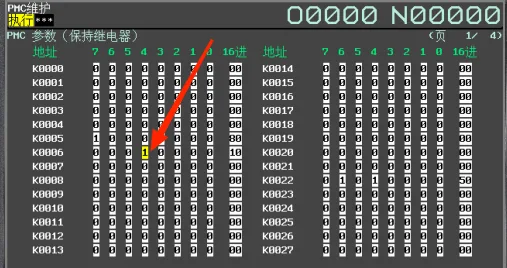
3. Press the SYSTEM function key on the panel, press the expansion key in the lower right corner of the screen, press the PMC maintenance key, and press the counter key. Change the setting value of the C8 oiling interval counter to 2 (oiling once every 2 minutes). Repeat several times to observe whether the oil pressure gauge pointer is in the green area when the grease pump is working. After the oil pressure is normal, change K6.4 to 0 and set the C8 counter. Change the fixed value to 180

Mitsubishi System V/T series models
After replacing the oil bag, the oil pressure is low when the oil is pumped. The steps for manual forced oil pumping and air exhausting are as follows:
1. Press the MAINTE key on the panel, press the maintenance key, press the password input key, enter the password MPARA, and press the INPUT key
2. Press the DIAGN key on the panel, press the I/F diagnostic key, press the modal output key, enter Y235/1, and press the INPUT key
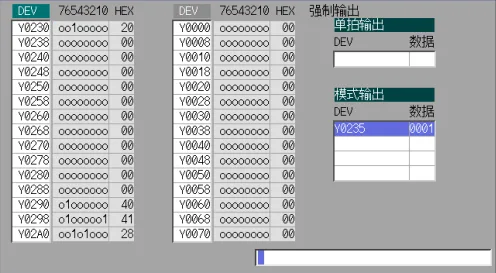
3. At this time, the grease pump starts to pump oil. Observe whether the oil pressure gauge pointer is in the green area when the grease pump is working. After the oil pressure is normal, press the mode clear to delete Y235/1